How to Reduce Packing Errors in Your Warehouse: 8 Proven Methods
You’re shipping 5,000 orders a day. Your error rate sits at the WERC DC Measures median of roughly 1.1%. That means 55 wrong packages leave your building every day. At $41 per error for D2C, you’re losing over $2,200 daily. For 3PLs, at $56 per error, it’s $3,080. Annualized, that’s $800K to $1.1M walking out the door in wrong shipments.
Most of those errors are preventable. Here are eight methods that work, ordered from foundational to advanced.
1. Standardize packing SOPs
Packing errors thrive in ambiguity. When packers make decisions about which box to use, how much void fill is enough, where to place the label, and which inserts to include, inconsistency is inevitable. Different packers make different decisions. Different shifts run different processes.
Write it down. Every client, every product category, every packaging type should have a documented standard operating procedure that specifies exactly what goes in the box and how it gets there. Include photos showing the correct pack configuration. Post visual references at each station.
For 3PLs, this gets more complex. Each brand client may have different SOP requirements. Document them separately, store them where packers can access them, and make the active SOP visible at the station based on which client’s orders are being packed. Ambiguity causes more packing errors than most ops leaders realize. Clear SOPs eliminate it.
Review and update your SOPs quarterly, or whenever a client changes their packaging requirements. Stale SOPs are worse than no SOPs because packers stop trusting the documentation.
2. Implement barcode scan-verify
Scan-verify is the baseline. Every item gets scanned at the pack station before going in the box. The system compares scanned UPCs against the order manifest and flags mismatches.
It catches wrong-SKU, missing-item, and extra-item errors reliably. Most WMS platforms support scan-verify natively or through modules, so implementation is straightforward. Cost is low: a barcode scanner per station plus configuration in your WMS.
The main limitation is speed. Each scan adds 2-4 seconds per item. For multi-item orders, scanning time accumulates. Some packers learn to shortcut the process by batch-scanning or multi-scanning, which undermines accuracy. Address this through training and monitoring. If packers are skipping scans, the system is adding friction without adding value.
Scan-verify catches 85-95% of SKU-level errors. A big step up from no verification. But it still misses visual errors, quantity manipulation, and packaging compliance.
3. Add visual verification with AI vision
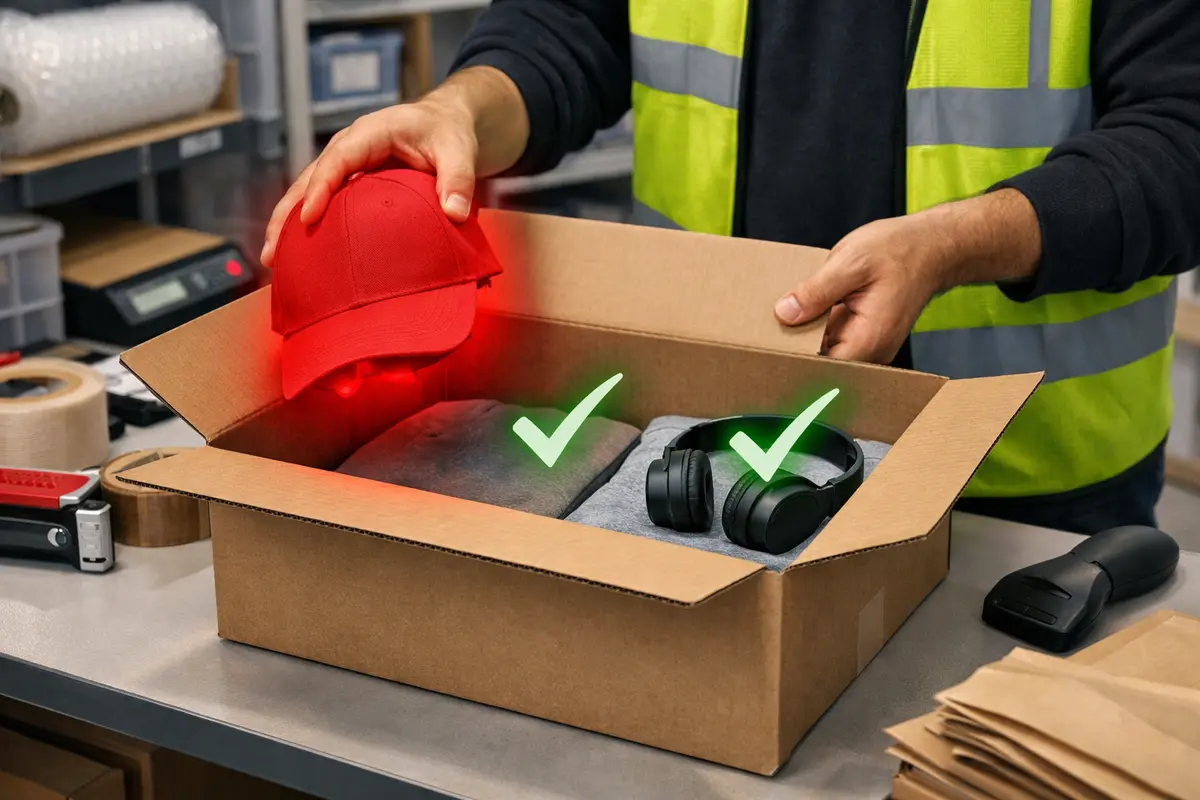
Where scan-verify checks barcodes, AI vision checks the actual items. Cameras at the pack station capture the contents of each order and computer vision models verify that what’s in the box matches what should be in the box.
AI vision catches what barcodes can’t: wrong variants that share similar UPCs, damaged packaging, missing inserts, incorrect quantities (a packer scanning an item twice but only placing it once), and packaging compliance issues like wrong box size or insufficient void fill.
The real advantage is speed: AI vision doesn’t slow down the packer. There’s no scanning step. The system verifies passively as items move through the station. Staci Americas achieved a 60% QA cost reduction across 19 stations this way, and DaVinci cut processing time by 30% across 6 locations.
For operations already running scan-verify, AI vision fills the gaps. For operations without any verification, AI vision provides a more comprehensive starting point.
4. Design station layouts to prevent mistakes
Some packing errors aren’t process failures. They’re design failures. When the station layout makes it easy to grab from the wrong bin, reach into the wrong tote, or confuse similar products, errors become a matter of probability.
Audit your station layout with fresh eyes. Are similar-looking products stored next to each other? Are active picks within easy reach and inactive SKUs farther away? Is there a clear staging area that separates “verified” from “not verified” items?
Apply basic poke-yoke (mistake-proofing) principles: physical barriers between totes, color-coded bins for different clients, dedicated zones for inserts and packaging materials. Add light-directed picking for multi-SKU orders. The goal is to make doing it right easier than doing it wrong.
Station layout changes are cheap compared to technology investments, and they often produce immediate results. Walk the floor during peak volume and watch where packers hesitate, reach across each other, or make substitution decisions. Those moments are where errors happen.
5. Use pick-to-light systems
Pick-to-light uses illuminated indicators on bins or shelves to direct the packer to the correct location for each item. The system lights up the bin containing the next item needed, the packer picks from the lit location, and confirms the pick. This removes the decision of “which bin?” from the packer’s cognitive load.
For multi-item orders, pick-to-light sequences the picks in the optimal order, reducing the chance of grabbing from the wrong location. It’s particularly effective in put-wall configurations where many orders are being built simultaneously.
The cost is moderate. Each lit position requires a sensor/light module, and you need a controller to drive the sequence. But the error reduction can be significant for operations with high SKU density or frequent multi-item orders. Combine pick-to-light with scan-verify for a belt-and-suspenders approach: the light tells the packer where to pick, the scan confirms they picked correctly.
6. Measure error rates per station, operator, and shift
Aggregate error rates hide patterns. A facility-wide 1% error rate might mean every station runs at 1%, or it might mean Station 7 runs at 4% while Station 3 runs at 0.2%. These are very different problems with very different solutions.
Break down your error data by station, by operator, by shift, and by client (if you’re a 3PL). Look for concentration. Is one station producing a disproportionate share of errors? Is one shift consistently worse? Are errors spiking for a specific client’s orders?
Concentrated errors usually have identifiable root causes: a confusing station layout, a new employee who needs additional training, a client with packaging requirements that aren’t clearly documented, or a shift that’s understaffed during peak hours.
Track error rates weekly and post them where your team can see. When packers know how their station compares to others, performance tends to improve. But frame it as growth, not punishment. Punitive metrics lead to under-reporting.
7. Train with digital work instructions
Paper SOPs get lost, ignored, or become outdated. Digital work instructions displayed at the pack station keep the correct procedure visible and current. When an order arrives at the station, the display shows exactly what should go in the box, in what sequence, with visual references.
For 3PLs with dozens of brand clients, digital work instructions solve the “which SOP applies?” problem. The system automatically displays the correct instructions based on the order’s client, product category, or special handling requirements. Packers don’t need to remember which brand uses tissue paper and which doesn’t.
New packers benefit the most. Instead of shadowing a veteran for a week and hoping they pick up the right habits, new hires can follow on-screen instructions from day one. Ramp-up gets shorter, and bad habits don’t get passed down.
Update instructions centrally and they propagate to every station immediately. No more walking the floor to collect old paper SOPs and distribute new ones.
8. Close the loop with root cause analysis
Catching errors is step one. Preventing them from recurring is step two. Every packing error should feed into a root cause process: why did this happen, and what would prevent it?
Most facilities treat errors as individual incidents. “The packer made a mistake.” But individual incidents usually point to systemic causes. Was the SOP unclear? Was the station poorly laid out? Was the packer rushing because they were behind on volume? Was the product packaging too similar to another SKU?
Build a simple root cause framework:
- Human error: Training gap, fatigue, rushing. Address with training, staffing, and pace management.
- Process error: SOP missing or unclear. Update the SOP and the work instructions.
- Design error: Station layout, product placement, or labeling makes the wrong action easy. Make physical changes to the station.
- System error: WMS pushed the wrong order, scan-verify didn’t flag a mismatch, or inventory data was wrong. Escalate to your systems team.
Review the top 5 error patterns monthly. Implement fixes. Measure whether the fix worked in the following month. This feedback loop is what separates facilities that stay at 1% error rates from facilities that push below 0.5%.
DaVinci reduced processing time by 30% across 6 locations not just by adding technology, but by using the data from AI vision to identify and address the root causes of errors and inefficiency. The technology finds the problems. The root cause process fixes them permanently.
Where to start
If you’re doing nothing today, start with SOPs and scan-verify. These are the lowest-cost, highest-impact first steps. If you already have scan-verify and your error rate is still above 1%, add AI vision verification to catch what barcodes miss. If you’re below 1% and want to push further, focus on station layout, measurement granularity, and root cause analysis.
You won’t hit perfection on day one. The point is to build a system where every error teaches you something and the rate trends down month over month.